
小程序源码:微信彩色昵称生成器
作者:xlnxin发布时间:2026-10-04分类:编程知识浏览:392
导读:微信彩色昵称生成器小程序微信彩色昵称生成器jsvar app = getApp();Page({ data: ...
微信彩色昵称生成器小程序
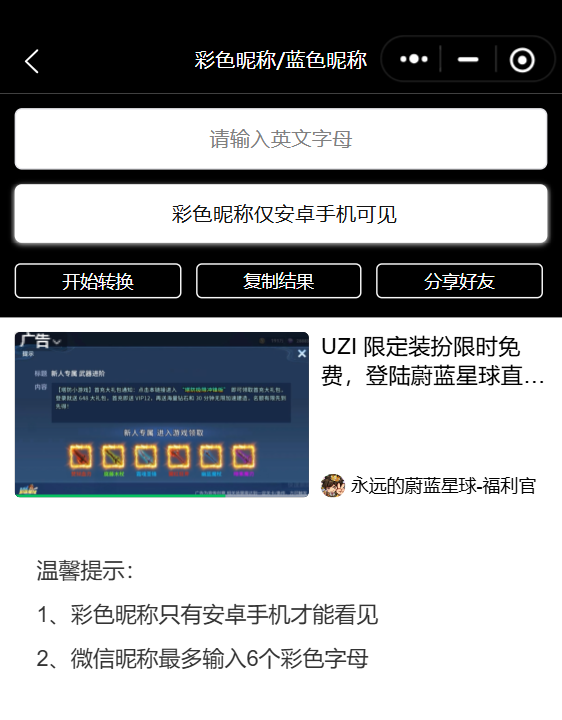
微信彩色昵称生成器js
var app = getApp();
Page({
  data: {
    current: null,
    hidden: !0,
    scrollTop: 0,
    inputShowed: !1,
    inputVal: "",
    textareaValue: "彩色昵称仅安卓手机可见",
  },
  bindKeyInput: function (t) {
    var conent = t.detail.value;
    var that = this;
    if (conent != '') {
      that.setData({
        //var number = val.replace(/[^0-9]/gi, "");提取数字
        current: conent.replace(/[^a-z]+/gi, ""),
        inputVal: conent.replace(/[^a-z]+/gi, ""),
        inputShowed: !0
      });
    }
  },
  clearInput: function () {
    this.data.current = null, this.setData({
      scrollTop: 0,
      inputVal: "",
      textareaValue: "彩色昵称仅安卓手机可见",
      inputShowed: !1
    });
  },
  changeText: function (r) {
    if (this.data.current) {
      var that = this;
      this.setData({
        textareaValue: this.strReplace(that.data.current.toLowerCase(), ["a", "b", "c", "d", "e", "f", "g", "h", "i", "j", "k", "l", "m", "n", "o", "p", "q", "r", "s", "t", "u", "v", "w", "x", "y", "z"], ["? ", "? ", "? ", "? ", "? ", "? ", "? ", "? ", "? ", "? ", "? ", "? ", "? ", "? ", "? ", "? ", "? ", "? ", "? ", "? ", "? ", "? ", "? ", "? ", "? ", "?"])
      })
    } else wx.showToast({
      title: "请输入英文字母",
      icon: "error",
      duration: 2000
    });
  },
  strReplace: function (t, e, a) {
    var n;
    if (e.length == a.length) {
      for (var s = 0; s < e.length; s++) n = new RegExp(e[s], "g"), t = t.replace(n, a[s]);
      return t;
    }
  },
  textCopy: function () {
    "彩色昵称仅安卓手机可见" != this.data.textareaValue ? wx.setClipboardData({
      data: this.data.textareaValue,
      success: function (t) {
        wx.getClipboardData({
          success: function (t) {
            wx.showToast({
              title: "复制成功",
              icon: "success",
              duration: 2000
            });
            app.adsShow();
          }
        });
      }
    }) : wx.showToast({
      title: "还没有转换呢",
      icon: "error",
      duration: 2000
    });
  },
  onShareAppMessage: function (t) {
    return {
      title: "彩色昵称生成器",
      imageUrl: "/img/share.png",
    };
  }
});
微信彩色昵称生成器wxml
<view class="container">
  <view class="top-banner-bg">
    <view class="weui-text-bar">
      <view class="weui-text-bar__form">
        <view class="weui-text-bar__box">
          <input bindinput="bindKeyInput" class="weui-text-bar__input" placeholder="请输入英文字母" value="{{inputVal}}"></input>
          <view bindtap="clearInput" class="weui-icon-clear" hidden="{{!inputShowed}}">
            <icon size="20" type="clear"></icon>
          </view>
        </view>
      </view>
      <view bindtap="textCopy" class="weui-text-bar__cancel-btn">{{textareaValue}}</view>
      <view>
        <button bindtap="changeText" class="share">开始转换</button>
        <button bindtap="textCopy" class="share">复制结果</button>
        <button class="share" openType="share"> 分享好友</button>
      </view>
    </view>
  </view>
  <scroll-view scrollY style="height: calc(100% - 300rpx);position:fixed; bottom: 0;left: 0;">
    <ad unit-id="adunit-a45c32b1287c13ed"></ad>
    <view class="bottom-change-list__box">
      <text>温馨提示:
        1、彩色昵称只有安卓手机才能看见
        2、微信昵称最多输入6个彩色字母</text>
    </view>

  </scroll-view>
</view>
微信彩色昵称生成器wxss
.container {
  position: absolute;
  padding-bottom: 0;
  background-color: #F8F8F8;
}

.top-banner-bg {
  position: fixed;
  top: 0;
  left: 0;
  z-index: 1;
  width: 100%;
  height: 300rpx;
  background: #000;
}

.weui-text-bar {
  position: relative;
  padding: 10px 10px;
  box-sizing: border-box;
  border-top: 0 solid #D7D6DC;
  border-bottom: 0 solid #D7D6DC;
  border-radius: 4px;
}

.weui-text-bar__cancel-btn {
  color: #121212;
  position: relative;
  background: #fff;
  border-radius: 5px;
  height: 80rpx;
  line-height: 80rpx;
  font-size: 28rpx;
  padding-left: 10rpx;
  z-index: 1;
  margin-top: 20rpx;
  text-align: center;
  box-shadow: 0px 1px 4px #dfdfdf;
}

.weui-text-bar__form {
  position: relative;
  border-radius: 5px;
  background: #fff;
  border: 1rpx solid #e6e6ea;
}

.weui-text-bar__box {
  position: relative;
  padding-left: 10rpx;
  padding-right: 10rpx;
  width: 100%;
  box-sizing: border-box;
  z-index: 1;
}

.weui-text-bar__box textarea {
  width: 100%;
  height: 180rpx;
  margin: 5rpx 0;
  box-sizing: border-box;
  padding: 5rpx;
  font-size: 28rpx;
  border-radius: 6rpx;
}

.textarea-focus {
  border: 1px solid #999;
}

.weui-icon-clear {
  position: absolute;
  top: 2px;
  right: 0;
  padding: 9px 8px;
  font-size: 0;
  z-index: 5;
}

.weui-text-bar__input {
  height: 80rpx;
  line-height: 80rpx;
  font-size: 28rpx;
  text-align: center;
}

.bottom-change-list__box {
  font-size: 30rpx;
  padding: 50rpx;
  line-height: 2;
}

.share {
  position: relative;
  float: left;
  margin-top: 28rpx;
  margin-right: 20rpx;
  padding: 0;
  height: 48rpx;
  line-height: 48rpx;
  width: calc((33.3% - 22rpx) + (20rpx / 3));
  background-color: #000;
  color: #fff;
  font-size: 24rpx;
  border-radius: 4px;
  border: 1px solid #F8F8F8;
  text-align: center;
}

.share:nth-child(3n) {
  margin-right: 0;
}
- 上一篇:关注我们
- 下一篇:已经是最后一篇了
- 编程知识排行
- 最近发表